Showing posts with label Powershell Tips and Tricks. Show all posts

Sunday, April 9, 2017

PowerShell Basics : Find commands by using Get-Command cmdlet.


Sometimes, the more we do advance things, the more we keep forgetting the  basics.

Today while working on some script, I forget the command  which I need to use.

I do know the module name of the command which it belongs to… So I just my little helpful cmdlet Get-Command –Module MoDuleName

and it showed me all the command of that particular module and along some some other useful commands too.


Smile 

AmanDhally - PowerShell

Happy PowerShelling..


Regards

Aman Dhally

Friday, May 20, 2016

PowerShell cmdlet of the Day : Compress-Archive

In the previous blog post we have seen how to extract a ZIP file.

But what about, how you can create a zip file by using PowerShell.

It's simple again, by using the Compress-Archive cmdlet.  The syntax of Compress-Archive cmdlet is simple, provide the -Path of the folder which you want to compress, then provide the      -DestinationPath of your .zip file and then set a -CompressionLevel, and after that hit enter.

Simple!

Compress-Archive -CompressionLevel Optimal -Path C:\temp\Data\

-DestinationPath C:\temp\aman.zip


In the the above command, I have set the -compressionLevel to Optimal , and then  provided the -path of my folder which I wan to zip and then the destination path of new zip file which in aman.zip. And hit enter, in the below screenshot you can see that it has started creating a zip file. 


Aman Dhally, Manya Kaur


In the below folder you can see, that our zip file is successfully created. Yayyy!!!!!


Aman Dhally, Manya Kaur

Thanks for the reading blog post.

Aman Dhally, Manya Kaur

With Regards.
Aman Dhally
If you like, you can follow me on Twitter and Facebook. You can also check my “You Tube channel
for PowerShell video tutorials. You can download all of my scripts from “Microsoft
TechNet Gallery”.

Thursday, May 19, 2016

PowerShell cmdlet of the Day : Expand-Archive


Yes, Yes, this was the most awaited cmdlet in the PowerShell world... Wow!! it's one of the coolest command ever exists for system admins.

Now , we can write scripts to unzip ZIP files, I mean, can write more efficient scripts to unzip files ( without using .net code).

Ok! let's be less dramatic.

If you want to unzip a zip file using PowerShell, then there is a cmdlet available for it, named Expand-Archive.

It's syntax  is simple, provide the path of .Zip file, then the path of Destination where you want to extract files. that's all!

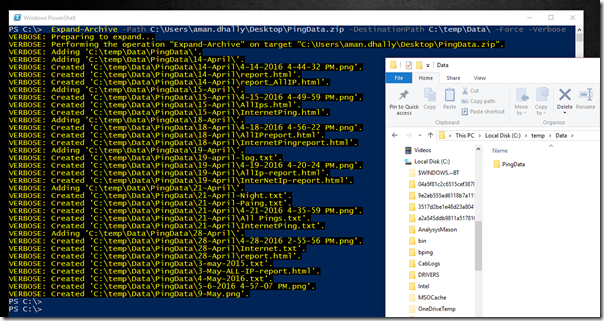
Expand-Archive -Path C:\Users\aman.dhally\Desktop\PingData.zip

-DestinationPath C:\temp\Data\ -Force -Verbose

In the above command, we are unzipping the PindData.zip to the folder C:\temp\Data. The parameters are quite self-explanatory.
m1

In the above screenshot you can see that the above command has run successfully and it' unzip the archived.

Now you can write script to unachieve your backups. :D

:)

With Regards.
Aman Dhally
If you like, you can follow me on Twitter and Facebook. You can also check my “You Tube channel
for PowerShell video tutorials. You can download all of my scripts from “Microsoft
TechNet Gallery”.